The Keyboard I Always Needed
2026-09-18 aiagentsandroidkeyboardskillshcboard is an Android keyboard for everyday typing with a real Ctrl, Alt and Fn, and no network access. I built the first version with AI in about a day.
TL;DR — hcboard is an Android keyboard you can type on all day that also has a full 60% layout with a real Ctrl, Alt and Fn, and it has no network permission at all. I wanted that keyboard for years. The pieces existed, just never in one app. The first version took about a day, and it has been getting better since. The idea, the spec, the testing and the feedback were mine. The routine work, the kind that used to take weeks, was the model's. And the reason that split worked is not the model. It's the harness around it.
The keyboard nobody made
Every Android keyboard I have used makes me pick a side.
On one side are the keyboards made for people: Gboard, Samsung's, the iPhone one I keep comparing everything to. Glide typing, suggestions, a dozen languages, the phone's own colours. Open a terminal in one of them and the illusion ends. There is no Esc, no Tab, and "Ctrl" isn't there at all.
On the other side are the keyboards made for tinkerers. Hacker's Keyboard gives you a full PC-style layout, and Unexpected Keyboard puts Ctrl, Alt and the rest a swipe away on every key. They are good at what they do, and I respect them. But you give up part of everyday typing to use them: glide, modern suggestions, the phone's own look. Writing a message to a friend on a keyboard designed around SSH feels exactly like that.
Hacker's Keyboard also has a problem the other one doesn't: nobody is maintaining it, and that is what made me stop waiting. Its last release came out in 2018, and the last commit landed in October 2024. There are over five hundred open issues and two dozen pull requests sitting in front of them, and people are still filing new ones this year into a repository where nothing has moved in two years. That's not a dig at its author, who gave a lot of people a lot of free years of use. It's what happens to an app that takes weeks of specialist work to write and will never be worth anyone's salary. One person gets tired, and there is nobody behind them.
So the gap was never "a keyboard with Ctrl on it". Those exist. The gap was a keyboard that is ordinary until the moment you need it not to be, and then, without switching apps or keyboards, it is a computer keyboard. The look of Gboard, the feel of the iPhone keyboard, and real developer keys, all in one place. Nobody had put those together.
And one more thing I wanted, which turned out to be the simplest to deliver: a keyboard that can't talk to anyone. hcboard isn't allowed to use the network at all. No analytics, no sync, no account, nothing you type is logged. The easiest way to prove a keyboard doesn't send your keystrokes anywhere is to make it unable to.
What it is
For everyday typing it behaves like the keyboard you already have. You can type or glide, pick a word from the strip above the keys, and let a tap of space fix the typo you just made. It speaks nine languages, each with its own layout and word list, and follows your phone's Material 3 colours in light or dark.
When you need more, it's already there. Unfold a phone or pick up a tablet and you get a full 60% board: Esc, Tab, Caps, Ctrl, Alt, Meta, the symbols printed where a PC keyboard prints them, and F1 to F12 behind Fn. On a normal phone, one tap puts the same keys in a strip above any layer. Modifiers latch the way you'd expect: tap to arm for one key, tap twice to lock, or hold and chord. And in a terminal, Ctrl+C is a real Ctrl+C, a signal, not a copy.
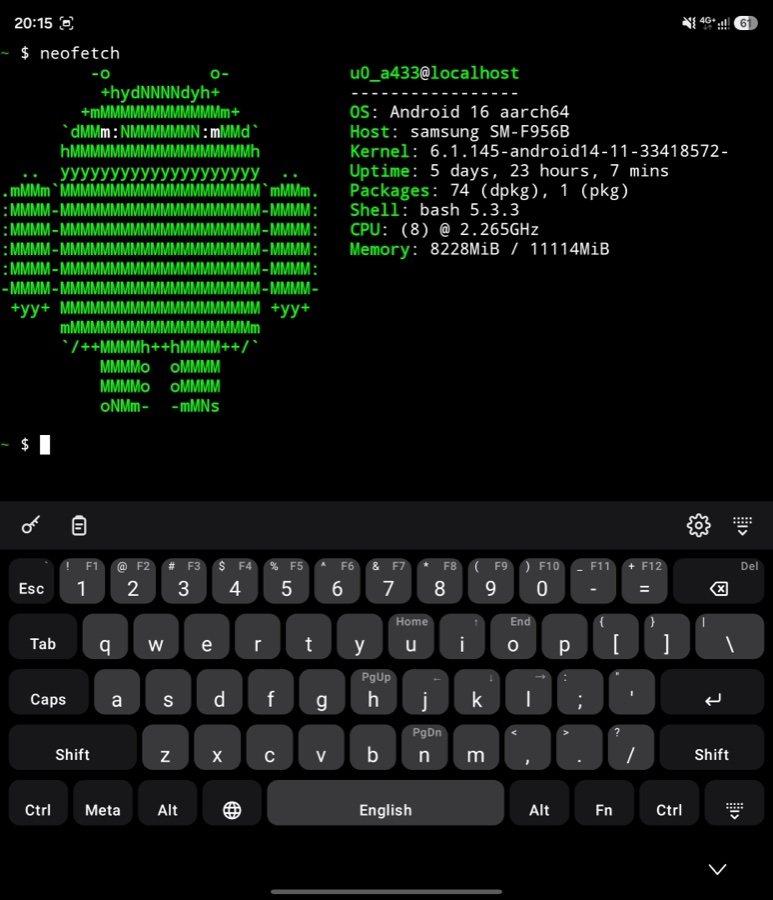
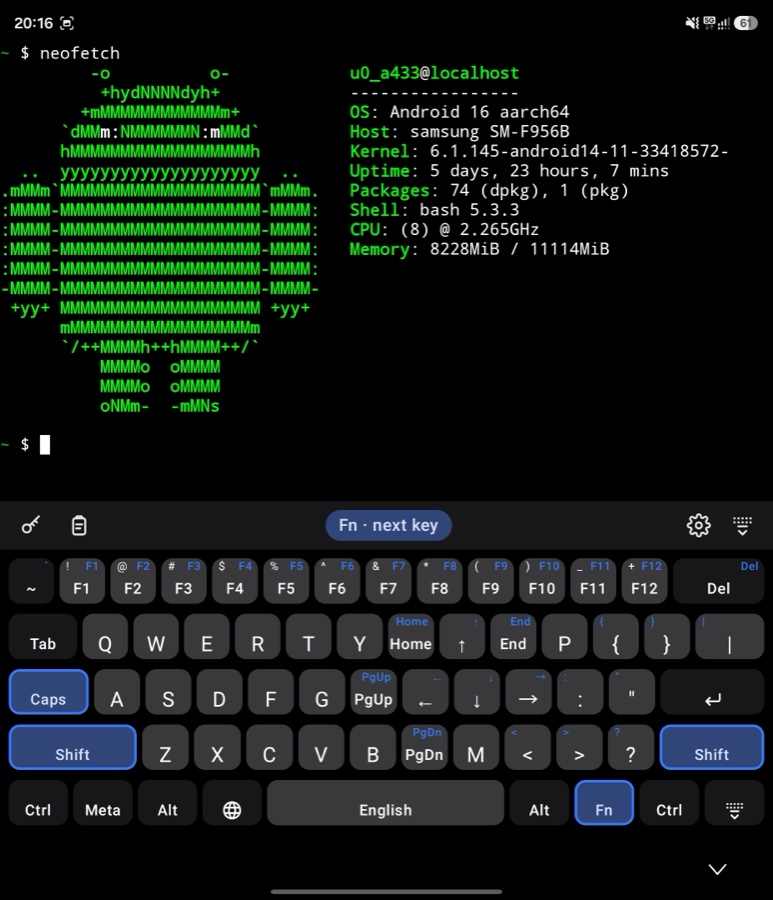
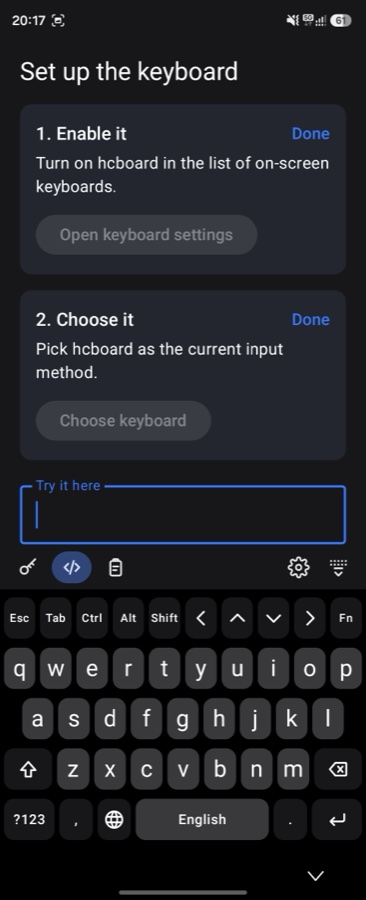
That's the short version. The README has the rest, and every push to main builds a dev APK you can install today.
What I brought
I want to be exact about this part, because "I made it with AI" gets read as "the AI made it", and that's not what happened.
The idea came first, and it came as a picture. Before there was a single line of code, there were drawings: the phone layers, the dark version, the full board on a foldable, what a key looks like when Ctrl is armed. I knew what every screen should look like, and so did the model.
Then the spec. I wrote down what the first version had to do, how I'd know it worked, and just as important, what it wouldn't do yet: no suggestions, no glide typing, no emoji. Glide typing arrived a few hours later anyway, but because I decided it was time, not because it crept in.
Then the testing a model can't do. The first version came back with an honest list of what it couldn't check without a phone in hand: a real terminal app, a real password manager, a real foldable, the haptic tick, two fingers chording on glass. That list was mine to work through.
An emulator can tell you the keyboard types "hello". It cannot tell you that the keys feel too small under a thumb, that the dark theme looks washed out next to every other app on the phone, or that a word you type every day never shows up in suggestions. Somebody has to hold the phone.
And then the feedback, which is where most of the product actually came from. I carried the phone around, typed on it, and said what was wrong. The keys felt small, so they got Samsung's proportions. The dark theme wasn't dark enough, so there's a Black one now. The Ukrainian suggestions were built from news text and kept offering words nobody uses in a chat, so I gave them the words people actually type. The English list had never heard of half the words I use every day, so it learned them. None of that came from a prompt like "make it better". It came from living with the thing.
That's my half: knowing what the keyboard is for. It's the part that can't be delegated, because nobody else has it.
What the model did
Everything else. And "everything else" is a lot.
Almost six thousand lines of Kotlin, and half as much again in tests. Every commit is mine, but most of the typing isn't.
What that typing covers is the part of the job I have never enjoyed and always had to do. Making a modern UI toolkit run inside an Android keyboard, which crashes in creative ways until everything is wired to exactly the right window. The logic behind a modifier key that can be armed, locked, held with another finger, and has to survive switching from letters to symbols and back. Sending a terminal the key presses it expects, and a normal text field the copy and paste it expects. The build that runs the tests on every change and puts a fresh APK online. The scripts that build nine word lists, and the credits for where they came from.
Each of those is a day or two of reading documentation and fighting the platform. Together, it's weeks. Here the first working version was there in about a day, on one long Thursday.
Not all of it was written from scratch, and it shouldn't have been. Glide typing stands on FlorisBoard's work, and most of the word lists come from Android itself, all open and all credited. That's what open source is for, and I've already said why I don't think using AI for this is theft.
Why it worked: the harness
Here is the thing I most want people to take from this, and it's not the speed.
The same model, with the same keyboard in my head, could have produced a mess. I know, because I've worked that way: solution in my head, agent on the keyboard, correcting it every time it drifted from a picture it couldn't see. Fast, and wrong, over and over. What made this one different is everything around the model.
The first piece is the skills. I use GKU, a set of Claude Code skills for the ordinary development cycle: plan, implement, review, fix, open the pull request, verify. I wrote about them in Code Got Cheap. The Plan Didn't. as a claim: the skill is the reusable asset now, and the code is comparatively disposable. hcboard is that claim tested on a real product instead of a demo. Every feature went through the same loop.
You don't have to take my word for it, it's all in the history. Dozens of pull requests in the first two days, most of them followed by a round of fixes from review. Each finding was fixed on its own, one at a time, so every correction can be read, and undone, by itself.
The second piece is the rules file. hcboard has a CLAUDE.md that the
agent loads every session: how to build, where things live, which one
part of the code is allowed to talk to Android directly, and the mistakes
that must not happen again. My favourite line in it is a warning about
mixing up two different clocks, and it ends with "that bug has been made
twice". That is the habit from
I Was Painting, Not Programming,
made concrete. If you correct the same thing twice, it belongs in the
file, and then you never correct it a third time.
The third piece is verification by something other than trust. Tests written with the code, a build that fails the moment something is off, and a list of what the emulator could not check, written down instead of glossed over. The model never had to be believed about whether something worked. It had to show it.
None of this is exotic. It's what good teams have always said they do. The difference is that with an agent it stops being a nice-to-have and becomes the thing that decides whether you get a product or a pile of plausible code.
The door that's closing
There is a part of this I find genuinely sad, and it isn't about me.
IzzyOnDroid is one of the good places to get Android apps: a curated repository, no tracking, no ads, built by people who care. It isn't the only project with a rule like this one, and it won't be the last. Its inclusion policy says plainly that it is "strongly opposed to apps which are fully or in part created by generative AI tools". Vibe-coded apps are rejected. You may use a model to research, brainstorm or debug, but "the code itself should be free of it". The reasons given are copyright and licensing, the labour behind the training data, the energy and water, and the crawlers hammering other people's servers.
I've taken those arguments seriously in public, at length, and I still think they're wrong. The training was already paid for, whether or not I subscribe, and no US court, which is where all of this has been tried, has yet found that learning from lawfully obtained code is theft. The more interesting question is the one the policy doesn't ask: compared to what? That was the whole point of the alternative being nothing. An app that nobody was ever going to write doesn't have an ecological footprint, or a licence, or a user. It just doesn't exist.
And that's what the rule actually produces. Not fewer bad apps, just fewer apps. The people writing these policies have a vision, and they're consistent about it, which I respect. But a rule against the tool, rather than against bad work, is the old instinct I wrote about a few weeks ago: smash the loom, and the cloth stops being made too. hcboard is tested, reviewed, small, readable and credited, and it would be rejected on principle without anyone opening a file. Meanwhile the gap that made me build it is still there, because an Android keyboard is weeks of work that nobody was volunteering for: the same arithmetic that emptied Hacker's Keyboard.
So we lose the sharing part. The apps still get made, by the people who need them, and they stay in a personal repository instead of reaching the next person with the same problem. That's a pity, and I don't think anybody wins it.
It also isn't the reason I built it. I wasn't making a product, and I haven't asked anyone to list it. I wanted a keyboard.
A day, not weeks
So here is the split, the way I'd put it to anyone who asks. The idea was mine, and so was the spec. The testing on a real phone was mine, and so was every "this feels wrong" that turned into a fix. The routine was the model's: the platform plumbing, the state machines, the tests, the build, the licences. Work that would have taken me weeks of evenings put a first version in my hand in a day.
I said before that the barrier didn't disappear, it moved. hcboard is where it moved to. Writing the code is no longer the hard part. Knowing exactly what you want, writing it down, and having a method that holds the model to it, that's the hard part now, and it's also the part that makes the result yours.
It's the keyboard I always needed. Nobody made it, so I did, with a lot of help and a very clear idea of what I was asking for.